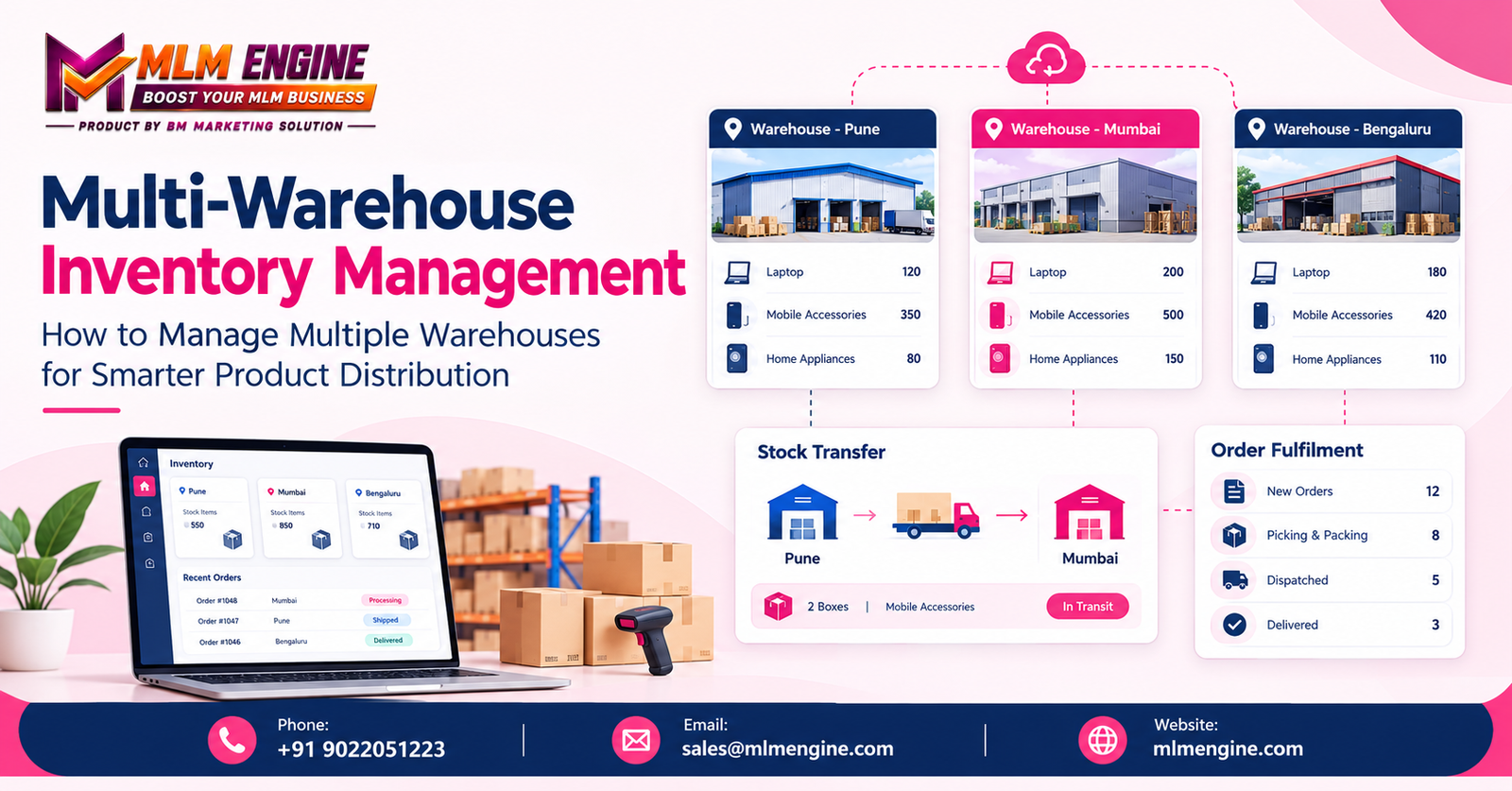
A distributor with several warehouses needs more than a stock total. Staff need to know which location holds each product, whether that stock is available to promise and what is already moving between sites. When each warehouse keeps separate spreadsheets or updates records at different times, the same item can appear available in one report and unavailable in another.
A structured approach to Multi-Warehouse Inventory Management helps teams coordinate product records, transfers, replenishment and order decisions across locations. This guide covers practical warehouse processes, software considerations, a three-warehouse example and a checklist to help distributors identify what to improve.
What Is Multi-Warehouse Inventory Management?
Multi-Warehouse Inventory Management is the process of coordinating stock records and product movements across two or more storage or distribution locations. It includes tracking quantities by warehouse, recording transfers, allocating inventory to orders, reconciling records with physical stock and reviewing combined reports.
Managing each location separately can work when operations are simple, but it can make company-wide decisions harder. A Multi-Warehouse Inventory Management System may support a shared view of stock while retaining warehouse-specific records. The degree of automation and centralization depends on the business’s procedures and the actual capabilities of its software.
Why Product Distribution Businesses Need Better Warehouse Coordination
Limited visibility across locations
Separate spreadsheets, paper records or disconnected tools can make it difficult to confirm available quantities. A salesperson may offer stock that has already been reserved, while a warehouse team may not know that another location has surplus.
Stock imbalances
One location may hold excess stock while another faces a shortage of the same item. A coordinated view helps purchasing and inventory staff consider whether to replenish, transfer or fulfil an order from another warehouse.
Delayed order fulfilment
If staff must call several locations to confirm stock, order processing can pause. Clear records of availability and location help teams apply their fulfilment rules without relying on repeated manual checks.
Inaccurate or duplicate records
Late entries, inconsistent product codes and duplicate records can cause differences between system quantities and physical stock. Standard identifiers and prompt transaction updates help reduce confusion.
Difficult transfer and replenishment planning
Without location-level demand and stock information, teams may transfer products too late or move goods that another site needs. Replenishment decisions are more useful when they reflect local demand, supplier lead times and stock already in transit.
10 Practical Ways to Manage Multiple Warehouses Effectively
1. Maintain a centralized view of inventory
Use a shared record that authorized staff can consult for quantities by location. Centralized Inventory Management works best when each warehouse updates receipts, dispatches, reservations and adjustments consistently. Keep product descriptions, units of measure and codes aligned across sites.
2. Assign unique codes to warehouses and products
Give each warehouse a distinct identifier and use one consistent SKU or product code for each item. A product should not have different codes simply because it is stored at different locations. Standard identifiers make reports and transfer documents easier to compare.
3. Track every stock movement between warehouses
Good Stock Transfer Management records the source and destination, product codes, quantities, dispatch date, receipt date, reference number and transfer status. The dispatching warehouse records what left; the receiving warehouse checks and confirms what arrived. Reconcile any difference rather than assuming the dispatched quantity was received.
4. Establish clear replenishment rules
Set location-specific minimums or reorder points using factors such as demand, supplier lead time, delivery schedules and available storage. A threshold suitable for a regional hub may not suit a smaller local site. Review rules when demand patterns or supply arrangements change.
5. Standardize receiving and dispatch
At receipt, check item codes, quantities and visible damage against the delivery documents. At dispatch, verify picked goods and record what leaves. Update stock records as part of the process not as an end-of-day memory task. Document exceptions such as short shipments, returns and damaged goods.
6. Choose the right warehouse for each order
An allocation decision may consider available stock, customer location, delivery commitments, shipping costs and warehouse capacity. Order Fulfilment Management should follow a documented rule for example, selecting the eligible location that best meets the business’s service and cost requirements. The right rule depends on how the business operates.
7. Conduct cycle counts and reconciliation
Schedule physical counts by product group, location or another workable plan. When a count differs from the recorded balance, investigate likely causes such as a missed receipt, incorrect pick or unrecorded damage before posting an adjustment. Recording the reason can reveal recurring process problems.
8. Monitor inventory across locations
A suitable process or platform can help staff check stock by product and warehouse. Real-Time Inventory Tracking depends on timely transaction entry, connectivity, integrations and the system’s actual behavior the label alone does not guarantee instant updates. When evaluating Inventory Tracking Software, test how receipts, reservations, dispatches and transfers change the quantities staff see.
9. Review inventory reports regularly
Useful Inventory Reporting and Analytics may include:
- Available stock by warehouse
- Products below location-specific reorder thresholds
- Slow-moving and non-moving items
- Transfer history and open transfers
- Order fulfilment status
- Inventory discrepancies and adjustments
- Product demand by location
Set a review schedule and assign an owner to follow up on exceptions. Reports inform operational decisions; they do not replace sound judgment or guarantee a particular business result.
10. Train employees and define responsibilities
Clarify who receives goods, records transfers, approves adjustments, picks orders and reconciles counts. Provide written procedures and training for each role. Limit adjustment permissions to appropriate staff and make sure employees know how to escalate unexpected differences.
How Software Can Simplify Multi-Location Inventory Management
For Multi-Location Inventory Management, software may bring warehouse records and transactions into a more consistent workflow. When assessing Warehouse Stock Management needs, a distributor might evaluate whether a platform supports:
- Warehouse-specific quantities and a shared product catalogue
- Transfer documentation, receiving and dispatch records
- Adjustment history and appropriate user access controls
- Order allocation tools and reorder alerts
- Consolidated reports and data exports
- Integrations with sales, purchasing, accounting or distribution tools
These are general capabilities to evaluate, not claims about any specific provider. A platform may support a requirement natively, through customization or through a third-party integration. Confirm the details with the provider and test the workflow against actual business scenarios. Consider whether an Inventory Control System or Warehouse Management System supports the process your teams need, rather than relying on a feature name alone.
A Practical Example of Managing Three Warehouses
Illustrative example not a customer case study or demonstration of a particular software feature.
A distributor operates Warehouse A, its main storage location; Warehouse B, a regional distribution site; and Warehouse C, a local fulfilment location. The product is a household cleaning liquid.
- Warehouse A receives a supplier shipment and records the quantity against the product code.
- Warehouse B’s team sees that its available stock is nearing the business’s chosen reorder threshold.
- An inventory manager checks quantities at all three locations, including any stock already reserved or in transit.
- The manager approves a transfer from a location with enough available stock.
- The dispatch team records the quantity sent, dispatch date and transfer reference.
- Warehouse B checks the delivery and confirms the quantity received.
- The teams reconcile the transfer record if the received quantity differs from the dispatched quantity.
- The manager reviews the updated stock report, and the order team applies its documented allocation rules to customer orders.
Recording each step helps teams see what is at each site and what is still moving. The example illustrates a process only; it does not promise specific results or describe a feature of MLM Engine.
How to Choose a Multi-Warehouse Inventory Management System
Identify your warehouse requirements
List your locations, product range, stock complexity, transfer frequency, order volumes and reporting needs. Include constraints such as connectivity or the need to track returns and quarantined goods.
Verify multi-location stock visibility
Ask to see both warehouse-specific quantities and a consolidated view. Confirm how the system distinguishes available stock from reserved, damaged or in-transit stock.
Check transfer and reconciliation workflows
Walk through transfer creation, approval, dispatch, receipt and discrepancy handling. Make sure the process produces records your teams can use.
Evaluate sales and distribution integrations
Check whether the system can work with your current sales platform, accounting tools, order processing system and other required software. Ask which integrations are available and whether extra setup is involved.
Review reporting and access permissions
Ask about report customization, transaction history, audit trails, user roles and data exports. Confirm who can adjust stock and how those changes are reviewed.
Understand costs and implementation
Compare setup fees, subscriptions, customization, integrations, training, maintenance and ongoing support. Consider the staff time required to clean up product records and prepare processes before launch.
Request a relevant demonstration
Ask the provider to demonstrate a realistic workflow using multiple locations, transfers, order allocation and reconciliation. A scenario based on your process is often more informative than a feature list.
Common Mistakes to Avoid
- Different product codes at different locations: standardize SKUs and maintain one approved product list.
- Delayed stock updates: record receipts, picks and dispatches as part of the task, with a clear owner.
- Undocumented transfers: require a transfer reference and dispatch and receipt confirmations.
- Ignored damaged, returned or quarantined stock: record it separately from stock available for orders.
- Treating in-transit stock as available at the destination: track it as a separate status until receipt is confirmed.
- Identical reorder thresholds everywhere: review demand and lead times by location.
- No physical reconciliation: schedule counts and investigate repeated discrepancies.
- Excessive adjustment access: restrict permissions and review adjustment history.
- Unverified integration needs: check data flows and requirements before selecting software.
- Expecting software to fix poor processes: clean up product records, define responsibilities and train staff alongside implementation.
Benefits of a Well-Organized Warehouse Management Process
A consistent process can support clearer stock visibility, more consistent records, better coordination between teams, documented transfers, more informed replenishment decisions, easier order allocation, structured reporting and accountability for stock movements. These outcomes depend on reliable data, suitable procedures, staff training and the capabilities of the chosen system; software alone does not guarantee them.
Exploring MLM Engine for Business Software Requirements
If you are evaluating software for distribution-related operations, first define your requirements for inventory, order management, reporting and integrations. Then ask providers to confirm how their current products handle your specific workflows. MLM Engine can be contacted to discuss business software requirements and whether its available solutions suit your needs. Verify current capabilities, implementation options, support arrangements and costs directly with the company before making a decision.
Multi-Warehouse Management Checklist
- Incomplete to-do itemEvery warehouse has a clear identifier.
- Incomplete to-do itemProduct codes are consistent across locations.
- Incomplete to-do itemStock records are updated promptly.
- Incomplete to-do itemTransfers include dispatch and receipt details.
- Incomplete to-do itemStock in transit is tracked separately.
- Incomplete to-do itemReorder thresholds reflect location-specific needs.
- Incomplete to-do itemOrder allocation rules are documented.
- Incomplete to-do itemPhysical stock counts are reconciled regularly.
- Incomplete to-do itemEmployees understand their responsibilities.
- Incomplete to-do itemReports are reviewed on a defined schedule.
- Incomplete to-do itemUser permissions and adjustment approvals are appropriate.
- Incomplete to-do itemSoftware and integration requirements have been verified.
Conclusion
Multi-Warehouse Inventory Management is not just about knowing how much stock a business owns. Teams also need to know where products are stored, how they move between locations, which quantities are available for orders and how records stay accurate.
Consistent procedures, reliable stock data, documented transfers, regular reconciliation and appropriate software can help distributors coordinate multiple sites more systematically. MLM Engine invites interested businesses to discuss their software requirements with the team. Confirm current product features and integrations directly before making a purchase decision.
Contact MLM Engine for business software enquiries