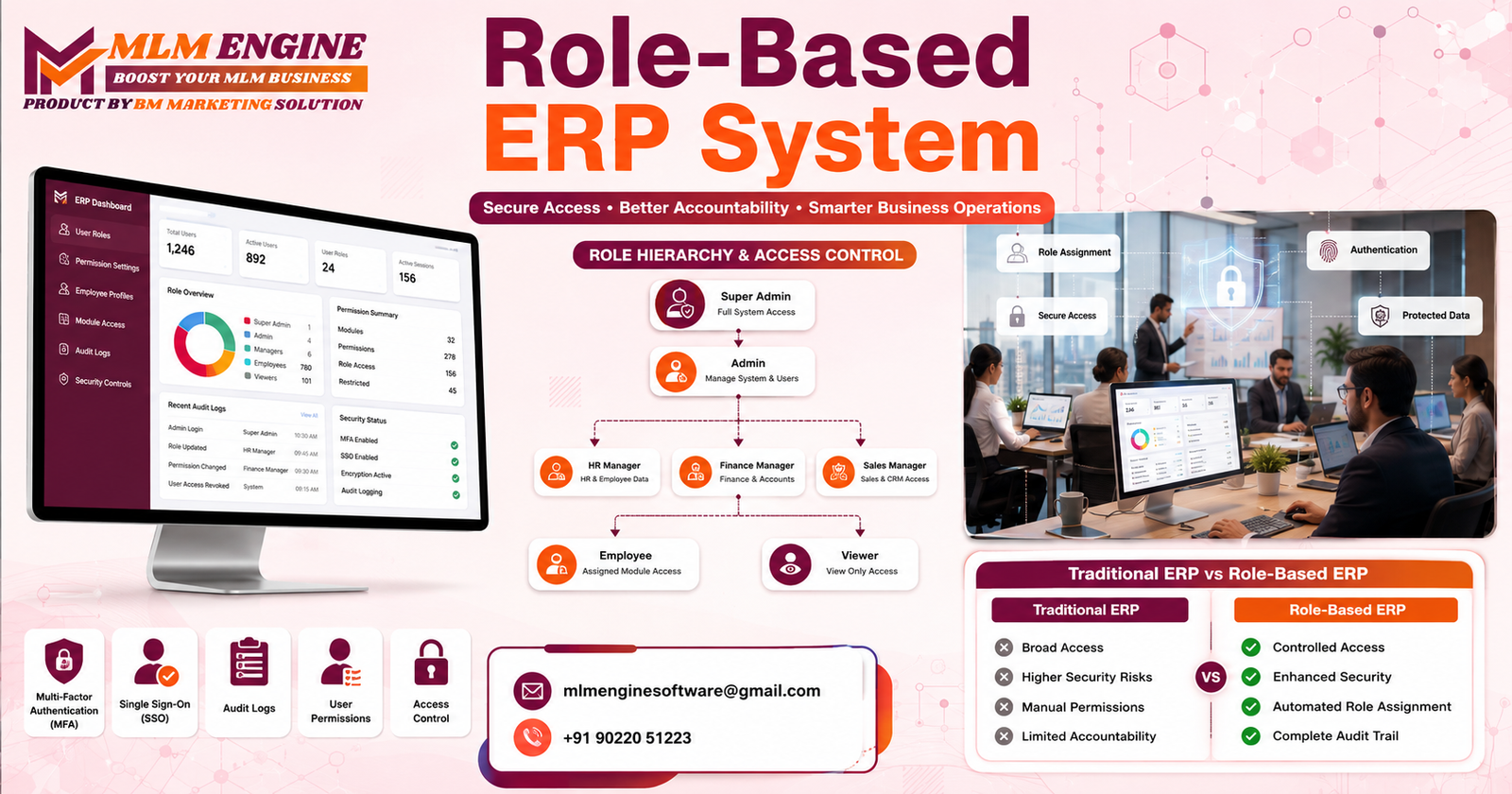
If you’ve ever watched an employee accidentally delete financial records because they had access they never should have had in the first place, you already understand why ERP security matters. Every business that runs on enterprise resource planning software eventually hits the same wall: too many people, too much access, and not enough control. That’s exactly the gap a Role-Based ERP System is built to close.
Unrestricted access inside an ERP platform is one of those risks that stays invisible until it isn’t. A junior staff member with admin-level permissions, a former employee whose login was never deactivated, a manager who can approve their own expense reports these aren’t hypothetical scenarios. They happen in real companies, every single day and they usually surface only after something has already gone wrong.
That’s where role-based access changes the game. Instead of giving everyone the keys to the whole building, a Role-Based ERP System hands out keys only to the rooms each person actually needs to enter. In this guide, you’ll learn what role-based ERP access really means, how it works under the hood, why it matters for accountability and compliance, and how to implement it without slowing your team down. We’ll also walk through a real-world style case study, expert implementation tips, and answers to the questions business owners ask most often.
What Is a Role-Based ERP System?
A Role-Based ERP System is an enterprise resource planning platform where access to data, modules, and actions is assigned based on a person’s role within the organization, rather than being granted individually to each user. Instead of an administrator manually deciding what every single employee can see or do, the system uses predefined roles like Finance Manager, HR Executive or Inventory Clerk and each role comes with a fixed set of permissions.
This model is formally known as Role-Based Access Control or RBAC, and it’s one of the most widely adopted security frameworks in enterprise software today. When a new employee joins, they’re simply assigned a role, and the system automatically applies the correct permissions. When someone changes departments or leaves the company, access can be updated or revoked instantly, without hunting down every module they might have touched.
Why Businesses Need Role-Based ERP Access
Most companies don’t set out to create messy, over-permissioned systems it just happens gradually. Someone needed temporary access for a project two years ago and never lost it. A new hire was given “admin” because it was faster than figuring out the right permission set. Over time, this creates what security professionals call “permission sprawl,” and it’s a serious liability.
A Role-Based ERP System solves this by design. Access isn’t an afterthought or a favor granted case-by-case it’s structured, predictable, and tied directly to job function. This matters for three big reasons: it reduces the attack surface for data breaches, it makes it far easier to prove compliance during audits, and it holds people accountable because every action in the system is traceable back to a specific role and user.
How Role-Based ERP Access Works
At a technical level, role-based access in ERP software runs on a fairly simple structure, even though the systems behind it can be sophisticated. Here’s the general flow:
- Roles are defined — for example, Sales Executive, Warehouse Supervisor, or Accounts Payable Clerk.
- Permissions are mapped to each role — what modules they can view, what data they can edit, what actions they can approve.
- Users are assigned to roles, not given permissions individually.
- The system enforces those permissions every time a user logs in or attempts an action, checking their role before allowing access.
- Changes cascade automatically — update a role’s permissions once, and every user in that role is updated instantly.
This is fundamentally different from older, flat-permission ERP systems where access was often granted ad hoc, module by module, user by user a process that’s slow to set up and even slower to audit later.
Core Components of a Role-Based ERP System
A properly built Role-Based ERP System typically includes several interlocking components working together:
Authentication vs Authorization
These two terms get mixed up constantly, but they mean different things. Authentication confirms who someone is usually through a username, password, or biometric check. Authorization determines what that verified person is allowed to do once they’re inside the system. A role-based system depends on getting both right: strong authentication to confirm identity, and precise authorization to control what happens next.
User Roles and Permissions
Every role in the system should map to a real job function, with permissions that match exactly what that function requires no more, no less. A finance clerk doesn’t need access to HR salary records. A warehouse staffer doesn’t need visibility into customer contracts.
Department-Wise Access Control
Beyond individual roles, many ERP systems layer on department-level restrictions, so that even users with similar job titles in different departments say, two “Managers” in Sales versus Operations see only the data relevant to their own department.
Audit Logs and Monitoring
Every action taken inside the ERP a record edited, a report exported, a permission changed should be logged with a timestamp and the responsible user. This isn’t just good practice it’s often a legal requirement, and it’s the single most useful tool when something needs to be investigated after the fact.
Workflow Approvals
Role-based systems make multi-step approvals possible without bottlenecks. A purchase order might need sign-off from a department head and then finance, with the system routing it automatically based on defined roles rather than someone manually forwarding emails.
Permission Management
Administrators need a clear, centralized dashboard to create, edit, and retire roles as the business evolves without needing to touch code or dig through database tables.
Multi-Factor Authentication (MFA)
Passwords alone are no longer considered sufficient protection for enterprise systems. MFA adds a second verification layer a one-time code, an authenticator app, or a biometric scan — making stolen credentials far less useful to an attacker.
Single Sign-On (SSO)
SSO lets employees log into multiple connected business tools with one set of credentials, reducing password fatigue while still keeping each tool’s permissions enforced individually behind the scenes.
Principle of Least Privilege
This is the guiding philosophy behind role-based access: give every user the minimum level of access required to do their job, and nothing more. It sounds simple, but it’s the single biggest factor in limiting damage if an account is ever compromised.
Compliance and Regulatory Benefits
For industries handling sensitive financial, health, or personal data, role-based access isn’t optional it’s often mandated. Regulations increasingly expect businesses to demonstrate exactly who can access what data and why. A Role-Based ERP System makes this straightforward because access rules are documented by design, and audit trails already exist to show auditors precisely how data has been handled, without weeks of manual reconstruction.
Common ERP User Roles Explained
While every business customizes its role structure, most Role-Based ERP System deployments include some version of the following:
- Super Admin — Full system access, typically reserved for IT leadership or system owners.
- Finance Manager — Access to budgets, invoices, financial reporting, and approvals.
- HR Executive — Employee records, payroll data, and recruitment modules.
- Sales Manager — Customer data, sales pipelines, and quotation approvals.
- Inventory/Warehouse Staff — Stock levels, purchase orders, and shipment tracking.
- Department Head — Approval authority and reporting visibility for their specific team.
- Read-Only/Auditor Role — View access to relevant records without the ability to edit, useful for external audits.
Benefits of Implementing a Role-Based ERP System
- Sharply reduced risk of internal data misuse or accidental deletion
- Faster onboarding and offboarding of employees
- Clear accountability, since every action is tied to a specific role and user
- Simplified compliance reporting and audit preparation
- Better system performance, since users interact only with relevant modules
- Reduced training time, because employees see a simplified, role-specific interface
- Lower risk of costly human error in sensitive areas like finance or payroll
Security Risks Without Role-Based Access
Without role-based controls, ERP systems tend to drift toward one of two extremes: either access is overly restrictive and constantly bottlenecked by IT requests, or it becomes dangerously permissive because it’s simply easier to grant broad access than manage it properly. The second scenario is far more common and far more dangerous. It opens the door to accidental data exposure, insider misuse, compliance failures, and a much larger blast radius if credentials are ever stolen.
Industries That Benefit From Role-Based ERP
Almost every industry benefits, but a few see especially high returns: manufacturing (protecting production and supply chain data), healthcare (patient and billing information), retail and e-commerce (customer and payment data), finance and banking, education (student and staff records), logistics, and professional services managing client-sensitive information.
Common Mistakes Businesses Should Avoid
- Granting temporary access that never gets revoked
- Creating a “super role” that quietly bypasses restrictions for convenience
- Failing to update roles as job responsibilities change
- Treating role setup as a one-time task instead of an ongoing process
- Ignoring audit logs until after an incident occurs
Future Trends in Role-Based ERP Security
Role-based access is evolving fast. AI-driven access management is beginning to flag unusual behavior automatically like a user suddenly accessing data outside their normal pattern and can suggest permission adjustments before a human even notices. Zero Trust Security models are pushing ERP systems to verify every request continuously, rather than trusting a session simply because someone logged in successfully once. Adaptive authentication is adjusting security requirements in real time based on risk signals, such as an unfamiliar device or location. And as more companies move to cloud ERP, providers are investing heavily in built-in role-based frameworks so businesses don’t have to build security from scratch.
Traditional ERP Access vs Role-Based ERP System
| Factor |
Traditional ERP Access |
Role-Based ERP System |
| Security |
Broad, often uncontrolled access |
Tightly scoped, permission-based access |
| Accountability |
Difficult to trace actions to individuals |
Every action tied to a specific role and user |
| User Permissions |
Manually assigned per user |
Automatically applied based on role |
| Compliance |
Harder to demonstrate during audits |
Built-in documentation and traceability |
| Audit Trails |
Often incomplete or inconsistent |
Comprehensive, automated logging |
| Productivity |
Slowed by manual permission requests |
Streamlined, role-appropriate access from day one |
| Administration |
Time-consuming, error-prone |
Centralized and scalable |
| Scalability |
Becomes unmanageable as headcount grows |
Easily extends to new users and departments |
| Workflow |
Manual routing and approvals |
Automated, role-driven approval chains |
| Risk Management |
Reactive, discovered after incidents |
Proactive, built into daily operations |
Case Study: How a Mid-Sized Distribution Company Fixed Its Access Problem
Company Background: A regional distribution company with around 150 employees across sales, warehousing, finance, and logistics had been running its operations on a legacy ERP system for nearly a decade.
Existing Challenges: Nearly every department-level employee had been granted broad “editor” access years earlier, simply because it was faster than configuring individual permissions. When a compliance review flagged the company for inadequate access controls, leadership realized they couldn’t even produce a clear list of who could access financial records.
ERP Implementation: The company moved to a modern Role-Based ERP System, starting with a full audit of existing job functions before a single permission was configured. IT worked with each department head to map real responsibilities to specific roles.
Role-Based Permission Setup: Seven core roles were created from Warehouse Staff to Finance Controller each with tightly scoped permissions. MFA was enabled for all finance and HR roles, and audit logging was turned on across every module.
Results Achieved: Within three months, the company passed its follow-up compliance review without a single access-related flag. Internal data-entry errors dropped noticeably, since employees could no longer accidentally edit modules outside their role, and IT reported a significant drop in time spent manually managing permission requests.
Lessons Learned: The biggest lesson was that role-based access isn’t a one-time IT project — it needed ongoing review as the company hired new staff and departments evolved. Building that review process into quarterly operations was what made the change stick.
Expert Tips for a Secure Role-Based ERP System
- Start with a permissions audit before configuring anything new.
- Never create a role broader than the job actually requires.
- Pair role-based access with MFA on all sensitive modules.
- Build offboarding into your HR checklist, not just IT’s to-do list.
- Keep a written record of what each role can and cannot do.
- Review dormant accounts every quarter and disable unused ones.
- Use audit logs as a routine check-in, not just an incident-response tool.
- Avoid granting “temporary” access without an automatic expiry date.
- Test new roles with a sample user before rolling them out company-wide.
- Choose an ERP provider that treats role-based access as a core feature, not an add-on.
- Involve department heads directly when defining what their teams need.
Why Businesses Choose MLM Engine for Secure ERP Solutions
Finding the right technology partner matters just as much as understanding the concept itself, and this is where MLM Engine stands out. MLM Engine builds a fully secure Role-Based ERP System designed around how businesses actually operate not a generic template stretched to fit.
With MLM Engine, companies get custom ERP development tailored to their industry, department-wise access management that mirrors real organizational structure, and granular user permission controls that go well beyond basic on/off toggles. Enterprise-grade security is built in from the ground up, backed by detailed audit logs so every action stays traceable.
MLM Engine also brings workflow automation and structured approval systems into the mix, so multi-step processes like purchase approvals or HR sign-offs happen automatically instead of getting stuck in email threads. For businesses planning ahead, MLM Engine offers flexible cloud deployment and a scalable ERP architecture that grows alongside the company, along with ongoing technical support long after launch.
Businesses exploring a move to secure, role-based ERP infrastructure can learn more directly at MLM Engine, where the team walks through how the platform adapts to different industries and team sizes.
Conclusion
Access control isn’t a back-office technicality it’s one of the most direct ways a business protects its data, its people, and its reputation. A Role-Based ERP System replaces guesswork and blanket permissions with a structure that’s secure, accountable and built to scale as a company grows. From tighter compliance and cleaner audit trails to faster onboarding and fewer costly mistakes, the benefits touch nearly every part of daily operations.
For businesses ready to move toward this kind of secure, structured ERP environment, MLM Engine offers exactly that: a Role-Based ERP System built around real organizational needs, backed by enterprise-grade security and ongoing support. Explore how MLM Engine can help at https://mlmengine.com/.
Email: mlmenginesoftware@gmail.com
Phone: +91 90220 51223
Website: https://mlmengine.com/
WhatsApp Channel: https://whatsapp.com/channel/0029Vaj8FP577qVKIi7ooC1d